
Email lands.
A ticket exists.
Quickdesk watches your support mailbox around the clock — every message becomes a numbered ticket with an owner and a deadline, the moment it arrives.
30 days free · No credit card required · $10/agent/mo (₱672 in PH)
Everything in its place
A shared inbox hides work. A queue shows it — who owns what, what’s due, and what’s slipping.
Email becomes tickets
Your dedicated Microsoft 365 support mailbox syncs in real time — every message numbered, owned, answerable.
Deadlines that hold
Response targets per priority, overdue flags, reminder emails before anything breaches.
Internal notes & audit trail
Team-only notes on any ticket, with an activity log of every change from open to close.
Sections & categories
Group your team into sections, nest categories beneath them, and keep every ticket with its owners.
AI summariesopt-in
Long thread? Get the core issue, what has been tried, and the next step. Off by default — your admin decides.
Multi-organization
One login, every workspace you belong to — agent in one org, client in another.
Response targets your clients can feel
Set how fast each priority must be answered. Quickdesk stamps the deadline on every ticket as it arrives, flags overdue work on the dashboard, and emails a reminder before you breach — not after.
Waiting on the client? Pause the clock with a required remark, and keep the paused time out of your metrics.
A help desk in your name
Every organization gets its own branded portal address. Clients sign in to raise tickets and follow progress — seeing exactly the statuses you choose to show, nothing more.
Control who can even open a ticket: anyone who emails you, allowlisted domains only, or invited and verified contacts.
Reports worth forwarding
Export an Excel report with exactly the columns you pick — waiting time, days overdue, resolution dates — computed on business hours, not wall-clock time.
Moving from another tool? Bulk-import your backlog with a validated template that catches bad rows before anything is created.
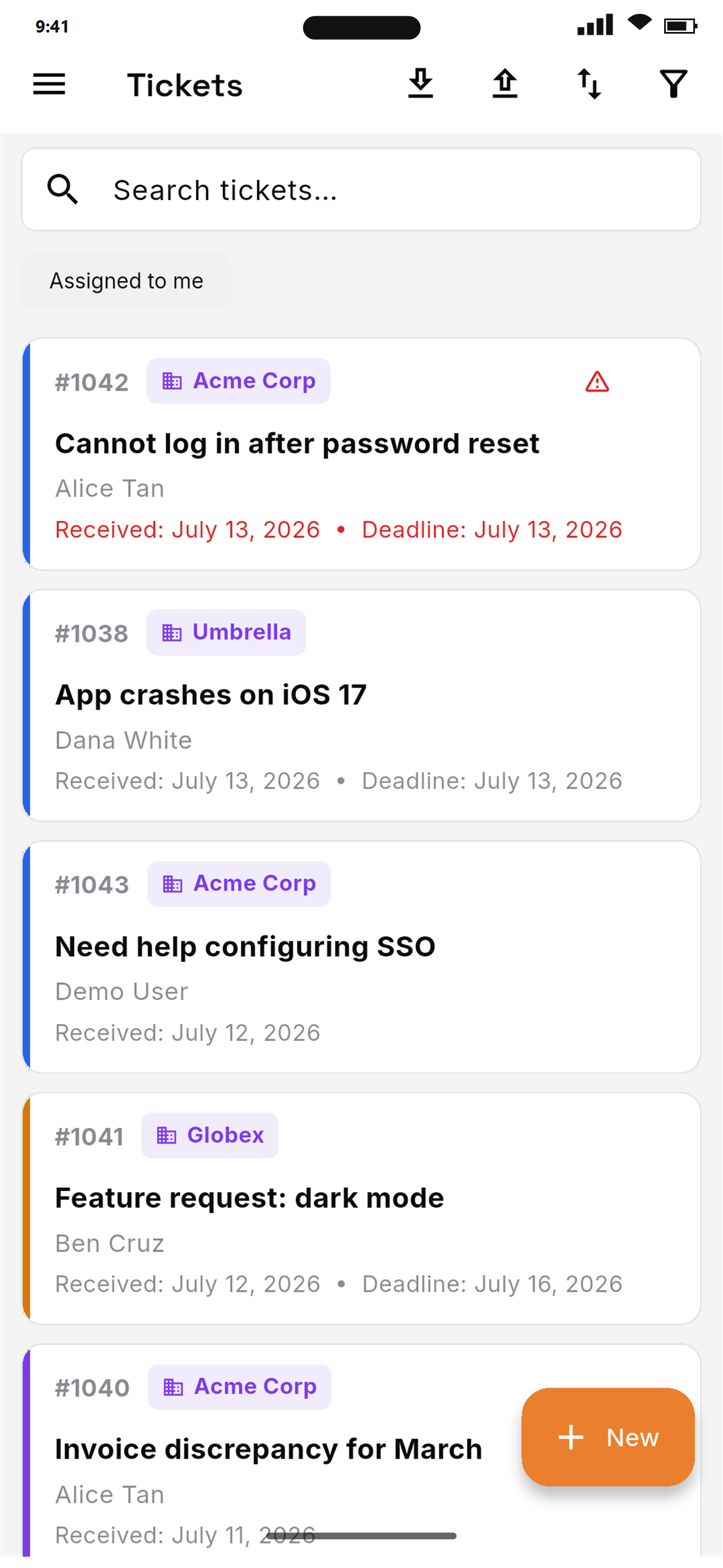
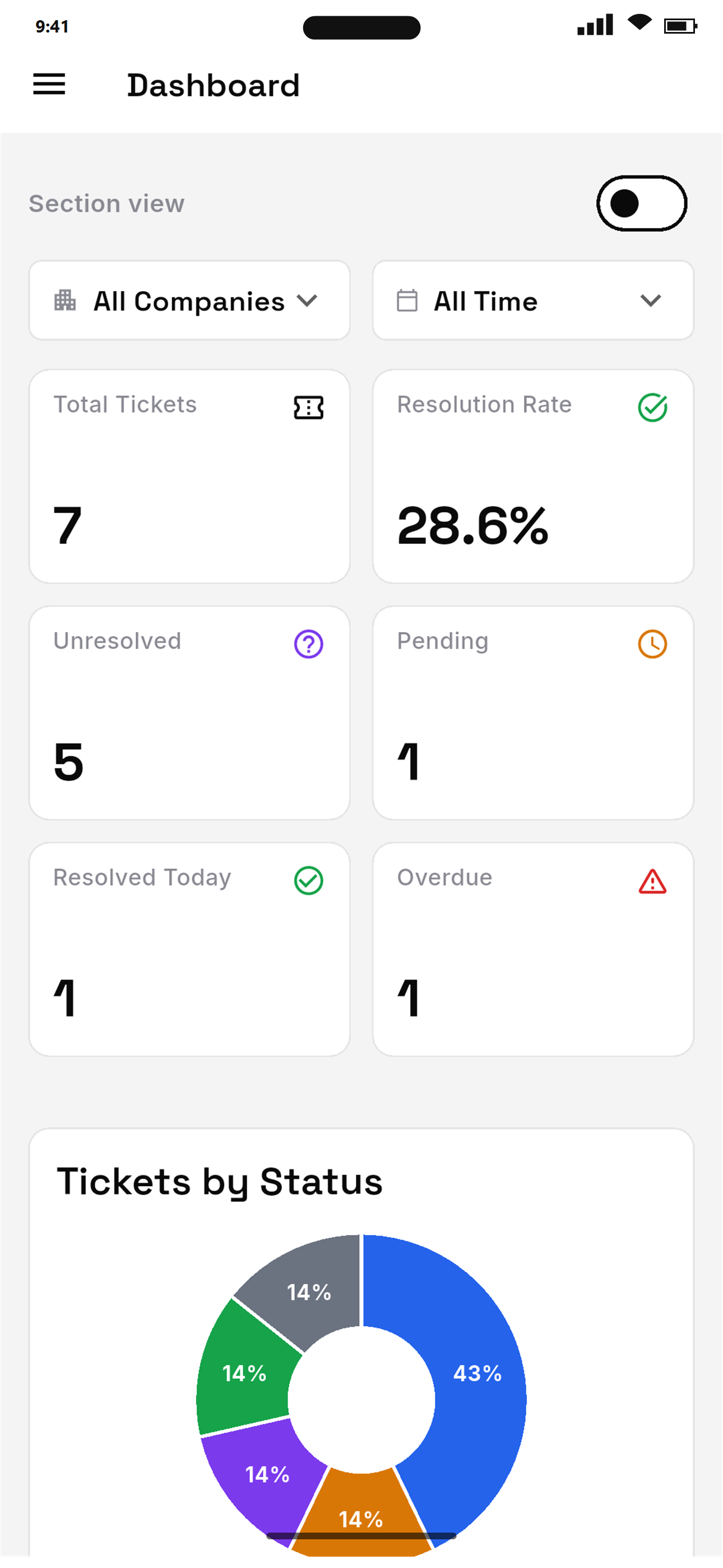
The queue in your pocket
Review tickets, leave internal notes, change status and priority, and reassign work without opening a laptop. Sign in once and switch between every organization you belong to.
Exactly where your data lives
Your tickets contain your clients’ business. Here is where that data sits and how it’s protected.
Where it lives
- Hosted on Vercel — SOC 2 Type II & ISO 27001 certified
- Stored in Neon Postgres — SOC 2 Type II & ISO 27001 certified
- AES-256 at rest, TLS in transit
- Support mailboxes on Microsoft 365
Your account
- Passwords hashed with bcrypt, never readable
- Email one-time codes on signup and reset
- Every request checked against org membership
- Roles decide what each person sees
The application
- HTTPS enforced with HSTS preloading
- CSP, clickjacking & MIME-sniffing protection
- Signed webhooks, constant-time comparison
- Mail notifications re-checked against Microsoft
To be precise: the SOC 2 and ISO 27001 certifications are held by our infrastructure providers, not by Quickdesk itself. We’re glad to walk your security team through our own practices in detail.
One plan. No feature gates.
₱672/agent/month in the Philippines · VAT not included · unlimited tickets
Start your 30-day free trialTicketing
- ✓Unlimited tickets
- ✓Real-time email-to-ticket
- ✓Bulk import from Excel
- ✓Multiple assignees & tags
- ✓Drafts & attachments
Automation
- ✓Deadlines per priority
- ✓Overdue reminders
- ✓Auto-close resolved
- ✓Priority escalation
- ✓AI summaries (opt-in)
Clients
- ✓Branded client portal
- ✓Company management
- ✓Contact history
- ✓Intake controls
Reporting
- ✓Analytics dashboard
- ✓Excel export, your columns
- ✓Business-hours metrics
- ✓Waiting-time tracking
Team
- ✓Per-agent billing
- ✓Roles & sub-admins
- ✓Multi-organization
- ✓Android app, iOS soon
- ✓Dedicated M365 mailbox
What counts as an agent?+−
An agent is any team member you assign a paid seat to so they can work tickets. Clients who only raise and follow their own tickets are free.
Is there really a free trial?+−
Yes. Every new organization gets 30 days and 3 agent seats, so your team can try Quickdesk together before you pay for anything. No credit card required to start.
Can I add or remove agents mid-month?+−
Yes. Add seats whenever you need them and pay a prorated amount for the rest of the period. Remove seats and the change applies from your next cycle.
How do I pay?+−
Customers in the Philippines are billed in pesos through PayMongo. International customers are billed in US dollars through Paddle.
Is VAT included in the peso price?+−
No — the ₱672 price is exclusive of VAT.
Tonight’s email deserves
tomorrow’s answer.
Connect your support mailbox and watch the first ticket create itself.
Start your 30-day free trialNo credit card required · $10/agent/mo after trial · cancel anytime